
How it works
Training that employees actually go through — on their phones or in the classroom
Employees receive a link, get in without a password and learn in their own language. Throughout the training they answer questions and get explanations, and at the end they take an exam and sign. Prefer to train face-to-face? Show the same training on a projector, and employees answer from their phones.
Employee access
One tap to get in. No password, no app.
Nothing to remember and nothing to install: the training opens in the browser on a phone or a computer. There are three ways in, and each company chooses what suits it.
Personal link
Each employee receives their own link by SMS, WhatsApp or email. They tap it, and the training opens.
Company site
Every company has its own web address. Employees identify themselves with an ID, passport or employee number and receive a one-time code by SMS or email.
In the classroom
In instructor-led training, employees scan the QR code on the screen and type in a phone number. No password, no SMS code.
And once they are in
They choose a language from the training's languages the company has enabled
They see what to expect — an exam, a signature and a certificate — and tap “Start training”
Progress is saved: they can stop and continue from the same point

During the training
Not just watching: answering, understanding, moving on
Every few slides, the training stops for a question. A correct answer gets a short explanation, and the training continues. A wrong answer gets an explanation of why, and another try. Only a correct answer lets the employee move on.
Questions during the training
A question about what the employee has just seen and heard. The explanation appears on screen and, in narrated trainings, is also read aloud.
No skipping
The “Continue” button unlocks only after the narration ends. There is no jumping ahead.
Narration and captions
The training is narrated in the employee's language, and what they hear can also be read in the captions.
Virtual presenter
In trainings we built with a presenter, a talking figure accompanies the narration in the corner of the slide.
Safety games
Spot the hazards in a picture, put steps in the right order and solve scenarios — this is how you check that the knowledge works in the field.
Exam at the end
A comprehension exam with a score. Anyone who does not pass gets another try, and all the answers are saved.
- Narration
- Captions
- Virtual presenter
Ask the instructor
Something unclear? Every worker can ask the instructor
A training taken alone still has someone to ask. Every slide has a button for a question to the instructor: the worker types or asks aloud, and gets an answer from the material of their own training — written on the screen and read aloud. The answer is written by artificial intelligence, and only from the training material.
Typed or spoken
Type the question or say it into the phone's microphone. The recording is turned into text and is not kept.
An answer from the training
The instructor answers only from what the training teaches, in the language the worker is learning in. When the training does not cover the question, it says so and does not guess.
By name, and aloud
The answer addresses the worker by first name, is written on the screen and read aloud. In a narrated training it is heard in the training's own narration voice.
No answers given away
No question can be asked during a question, a game or an exam, and the instructor does not hand out exam answers.
The manager sees what was unclear
A question the training did not cover appears in the manager portal, and the company's administrator marks it once it is handled.
Kept in the training record
Questions about the training material and their answers are kept in the worker's training record, beside the exam and the signature.
The answers are written by artificial intelligence from the training material. They are an aid to the worker and do not replace the safety officer or the direct manager.
 The instructor's answer
- Typed or spoken
- From the training material
- Read aloud
Instructor-led training
You train in the classroom. The system keeps the records.
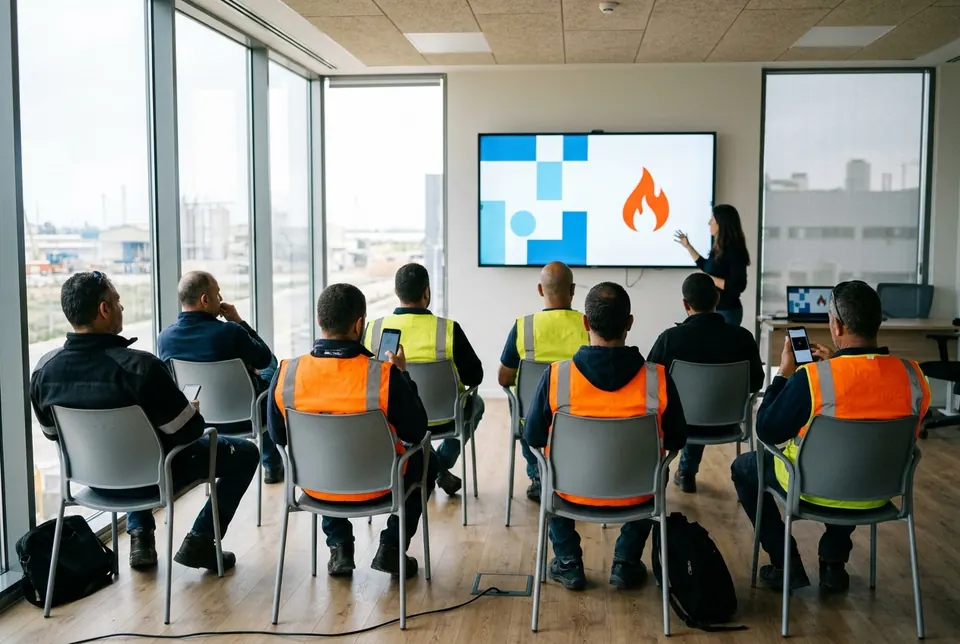
Present any training in the system on a projector, a TV or a single computer, at the instructor's pace. Employees join from their phones with a QR code and answer the questions in their own language. At the end, an attendance list and a session report are saved.
From 16.10.2026, annual safety training under the regulations is, as a rule, given face-to-face.
What changed in the regulationsThree screens, one training
A pan of oil catches fire and you cover it with a fire blanket. Which side of the fire triangle did you remove?
- 1Heat2
- 2Oxygen17
- 3Fuel3
22 answers from the room
Scan to join
K7QM4P2X
Audience screen
On the projector: the slides, narration, videos and presenter, just as in the individual training. When a question is asked, it appears with the number of answers from the room.

Instructor's screen
On the instructor's computer: the next slide, instructor notes, the correct answer and the explanation. The audience does not see the answer until the instructor reveals it.
- עברית
- Русский
- English
- Deutsch
- Español
- العربية
- አማርኛ
- ไทย
- 中文
- हिन्दी
Ольга, ваше участие записано. Спасибо!
На сковороде вспыхнуло масло, и её накрыли противопожарным покрывалом. Какую сторону треугольника горения мы убрали?
- 1Тепло
- 2Кислород
- 3Горючее
Ответ сохранён. Его можно изменить, пока инструктор не покажет правильный ответ.
Employee's phone
The question appears on each employee's phone, in the language they chose. They answer, and see the correct answer when the instructor reveals it.
Instructor's language, audience's language
The instructor presents in the employees' language — and reads their own
Employees see and hear the training on the projector in their language: Amharic, Arabic, Russian or any other language the training exists in. At the same time the instructor's screen shows the same slide in the instructor's language — with the script, the correct answer and the explanation.
Same place, two languages
Every slide change, question and exam moves together on the projector and the instructor's screen. Offered only when the training is the same in both languages.
Ask the instructor
An employee asks from their phone in their language, in writing or by voice. The instructor reads the question translated and answers, and the answer returns to every phone in the employee's language.
Message to the room
The instructor types or says a message in their own language. It appears on the projector in the room's language, is read aloud, and reaches every phone in the employee's language.
How to run a session
Open the training
Choose a training in the system and connect a projector. You can also present from a single computer.
Open a documented session
Enter the location and the instructor. The date and time are recorded automatically.
Employees join
They scan the QR code and type in a phone number. Anyone without a phone registers with the instructor.
Present and ask
Move at your own pace, with a presentation remote if you like. Show a question, see how many have answered, then reveal the answer.
Finish and document
Confirm the attendance list, and the session report is saved as a PDF in the company's records.
A few more things worth knowing
Same content, two ways
The training employees take on their phones is the same training you present in the classroom. Nothing is built twice.
Choose what to turn on
Narration, presenter, captions, games, questions and the exam — turn each one on or off per session, without changing the training.
Everyone in their own language
In the same room, each employee sees the question on their phone in the language they chose.
Large groups too
Mark attendance for several participants at once, and add by name anyone who came without a phone.
Back on track after a glitch
A refresh, a dropped connection or a frozen computer — the presentation returns to the same slide.
Games on the big screen
The training's safety games appear on the projector, and the room solves them together.
Finishing the training
Exam, signature and certificate — all in the employee's record
At the end of the individual training, the employee takes a comprehension exam, confirms the declaration and signs with a finger. The certificate is issued immediately, and the manager sees who finished, when and with what score.
Comprehension exam
Questions on what was learned, with a score. Anyone who does not pass gets another try.
Declaration and signature
The employee confirms that they have read and understood, and signs with a finger on the screen. The signature is kept as it was drawn.
Instant certificate
A PDF certificate with the employee's name, the training, the date and the score.
Everything in one place
The exam, the signature and the certificate are kept in the employee's record, ready for any inspection.
Certificate of Completion
Dana Cohen
Annual safety
12 Nov 2026Score: 92
The screens in the illustrations are based on the system. The names and data are examples only.
Frequently asked questions
Do employees need to install an app or remember a password?
No. The training opens in the browser from the personal link, or through the company site with a one-time code. In the classroom, a QR code and a phone number are all it takes.
What happens if an employee stops halfway?
Their progress is saved. When they come back to the link, they continue from the same point.
Can an employee get through the training without answering correctly?
No. To get past a question during the training, the employee has to answer it correctly. After a mistake, an explanation is shown and they can try again. At the end there is an exam with a score.
What do you need to run instructor-led training?
A computer with a browser and an internet connection, plus a projector or a TV. You can also present from a single computer. Employees do not have to have a phone.
Does every employee get a certificate in instructor-led training?
No. In instructor-led training, attendance is recorded and a session report is saved in the company's records. A personal certificate is issued in the individual training, after the exam and the signature.
How is an employee without a phone registered?
The instructor marks them as present on the list, or adds them by name.
In which languages?
The system works in ten languages: Hebrew, English, Russian, German, Spanish, Arabic, Amharic, Thai, Chinese and Hindi. Each training exists only in the languages prepared for it, and the employee chooses from those. The translations into Arabic, Amharic, Thai, Chinese and Hindi are still awaiting review by a native speaker.
Can I train a class in a language the instructor does not speak?
Yes. On the projector and the phones the training appears in the employees' language, and the instructor's screen shows the same slide in the instructor's language, with the correct answer and the explanation. Employees can ask the instructor from their phones in their own language, and the question is translated for the instructor. The translation is done by AI; the answers come from the instructor.
Can a worker ask questions during a training they take alone?
Yes. On every slide the worker can ask the instructor, in writing or aloud. The answer is written by artificial intelligence from the training material only, appears on the screen and is read aloud. No question can be asked during a question, a game or an exam. A question the training did not cover appears in the manager portal. The answers do not replace the safety officer.
Want to see this with your own trainings?
In a short demo we will show you how employees get in, how the questions work during a training and how you present in the classroom — on a subject that interests you. Try a sample training